
Schema Validation
NRG uses TypeBox schemas for runtime validation on both server and client. Schemas serve two purposes: they validate data at runtime with AJV, and they provide TypeScript type inference via Infer.
Defining Schemas
Use defineSchema to create a schema with a required $id:
import { defineSchema, SchemaType } from "@bonsae/nrg/server";

export const ConfigsSchema = defineSchema(
  {
    name: SchemaType.String({ default: "" }),
    retries: SchemaType.Number({ default: 3, minimum: 0, maximum: 10 }),
    verbose: SchemaType.Boolean({ default: false }),
    tags: SchemaType.Array(SchemaType.String(), { default: [] }),
    metadata: SchemaType.Optional(
      SchemaType.Object({
        version: SchemaType.String(),
      })
    ),
  },
  { $id: "my-node:configs" }
);
The $id is required and must be unique across all schemas. It's used as the AJV cache key.
Type Inference
Extract the TypeScript type from any schema:
import type { Infer } from "@bonsae/nrg/server";

type Config = Infer<typeof ConfigsSchema>;
// { name: string; retries: number; verbose: boolean; tags: string[]; metadata?: { version: string } }
Client-Side Inference
The client package resolves the same schemas to their editor form representation. NodeRef becomes string (the node ID stored in the editor) and TypedInput becomes { value: string; type: string }:
import { useFormNode } from "@bonsae/nrg/client";
import type { ConfigsSchema, CredentialsSchema } from "../../server/schemas/my-node";

const { node, errors } = useFormNode<typeof ConfigsSchema, typeof CredentialsSchema>();
// node.name → string, node.server → string (NodeRef), node.target → { value, type }
See Custom Form Component for a full example.
Config Schema
The configSchema static property validates node configuration when a node instance is created. Validation failures produce warnings (they don't prevent the node from starting):
export default class MyNode extends IONode<Config> {
  static readonly configSchema: Schema = ConfigsSchema;
  // ...
}
Default values from the schema are used by the editor to initialize new node instances.
Output and the message envelope
Every node produces an output. this.send(x) always means "x is the result" — never "x is the whole outgoing message". The framework merges the value into the incoming message:
this.send(result)
// outgoing: { ...msg, output: result }
So upstream context propagates automatically. By default (carry mode) the context flows through without growing; opt into trace mode to also keep the full prior message under input as a recoverable provenance trail (msg.input.output…) — see Context modes. outputsSchema describes the result value (output validation runs before the merge).
This means a node sets only output — it does not set arbitrary top-level message properties. Multi-value results go under output as one object:
this.send({ records, totalSize, done }); // msg.output = { records, totalSize, done }To interoperate with Node-RED core nodes (which key on msg.payload, msg.topic, etc.), use a change/set node at the boundary to map output onto the property the core node expects.
Custom return properties per port
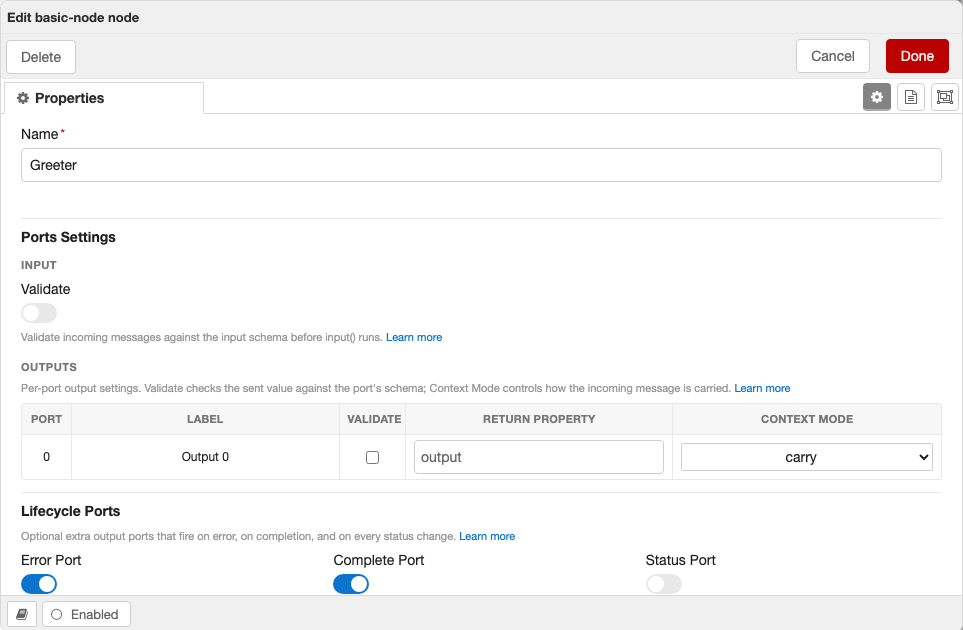
Every output port's return key is "output". Declaring outputReturnProperties lets the node author set a different default per port — and surfaces an editable Return Property column in the editor's Outputs table so flow authors can override each port's key:
const ConfigsSchema = defineSchema(
  {
    name: SchemaType.String({ default: "" }),
    // port 0 defaults to `result`; every other port falls back to `output`
    outputReturnProperties: SchemaType.OutputReturnProperties({
      default: { 0: "result" },
    }),
  },
  { $id: "my-node:configs" },
);- Keyed by output port index; a missing or empty entry falls back to
"output". - Keys must be valid JavaScript identifiers — validated in the editor and again at node construction.
- Named-port sends (
sendToPort) resolve the same per-port key by index. - Built-in complete and error ports always carry
input(so a flow resumed off the complete port — e.g. an iterator continuing after all elements — keeps the same lineage); the status port is a notification and stays raw.
These per-port settings — validation, return property, and context mode — are configured by the flow author in the editor's Outputs table:
Context modes
send() and sendToPort() take no mode argument — how each output carries the incoming context is resolved per port from config, falling back to carry. carry is both the default and the floor; to let the flow author choose a different mode per port, declare outputContextModes:
const ConfigsSchema = defineSchema(
  {
    name: SchemaType.String({ default: "" }),
    // port 0 is configurable (its dropdown is seeded to `trace`); every other
    // port stays locked to `carry`
    outputContextModes: SchemaType.OutputContextModes({
      default: { 0: "trace" },
    }),
  },
  { $id: "my-node:configs" },
);
This surfaces a Context Mode column in the editor's Outputs table. A port with a declared default renders an editable dropdown seeded to that value; a port without one renders carry, disabled — the author opts each port in by giving it a default:
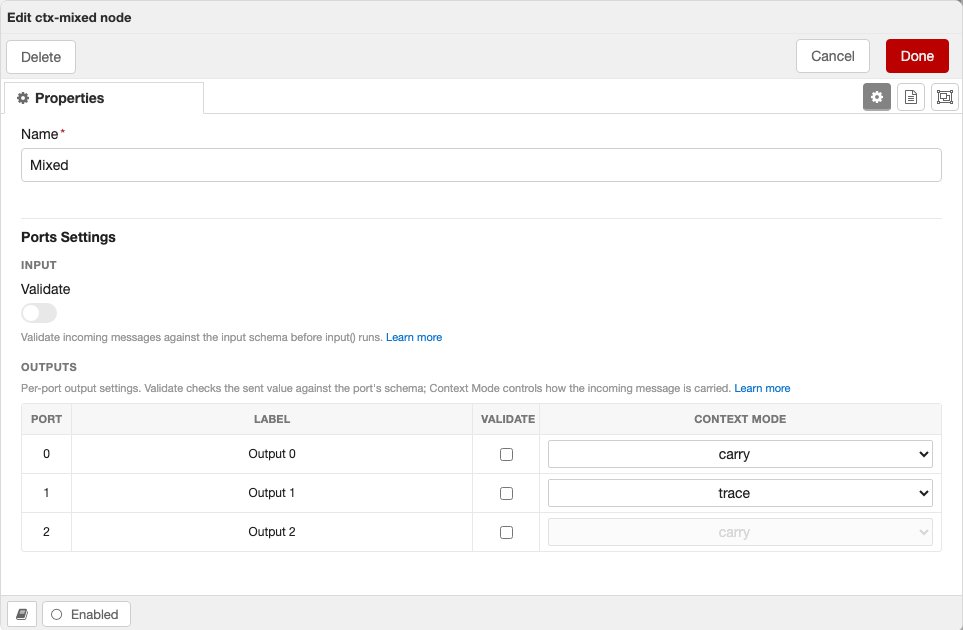
The three modes:
- carry (default/floor): keep all incoming keys (including any upstream
input) but don't record this node, so context flows through without the provenance chain growing. The safe default for loops and long chains. - trace: full provenance — keep all incoming keys and also push the prior message under
input, so every overwritten value stays recoverable (msg.input.output). The chain grows one frame per node; opt in for linear flows that want lineage. - reset: the outgoing message is only the result — use for source nodes that intentionally start a fresh context.
Without outputContextModes, every port resolves to carry and the column is hidden. Named-port sends (sendToPort) resolve the same per-port mode by index.
The framework never deep-clones (so streams, Buffers, and class instances pass through intact); Node-RED's runtime clones messages 2..N on fan-out, so parallel output branches are already isolated from each other at delivery.
Credentials Schema
Credentials are stored separately and encrypted by Node-RED. Define them with credentialsSchema:
export const CredentialsSchema = defineSchema(
  {
    apiKey: SchemaType.String({ default: "" }),
    secret: SchemaType.String({ default: "" }),
  },
  { $id: "my-node:credentials" }
);export default class MyNode extends IONode<Config, Credentials> {
static readonly configSchema: Schema = ConfigsSchema;
static readonly credentialsSchema: Schema = CredentialsSchema;
async input(msg: Input) {
const apiKey = this.credentials?.apiKey;
// ...
}
}The build system automatically extracts credential field types (text/password) from the schema for the Node-RED editor.
Input Schema
Validate incoming messages before they reach your input() handler:
const InputSchema = defineSchema(
  {
    payload: SchemaType.String(),
    topic: SchemaType.Optional(SchemaType.String()),
  },
  { $id: "my-node:input" }
);

export default class MyNode extends IONode<Config, any, Input> {
  static readonly inputSchema: Schema = InputSchema;
  static readonly validateInput = true;

  async input(msg: Input) {
    // msg.payload is guaranteed to be a string here
  }
}
Set validateInput = true on the class to enable validation. Invalid messages throw an error.
Output Schema
Validate outgoing messages when this.send() is called:
const OutputSchema = defineSchema(
  {
    payload: SchemaType.Object({
      result: SchemaType.String(),
      timestamp: SchemaType.Number(),
    }),
  },
  { $id: "my-node:output" }
);

export default class MyNode extends IONode<Config, any, Input, Output> {
  static readonly outputsSchema: Schema = OutputSchema;
  static readonly validateOutput = true;

  async input(msg: Input) {
    this.send({
      payload: { result: "ok", timestamp: Date.now() },
    });
  }
}
For nodes with multiple outputs, provide an array of schemas. The number of output ports is derived from the array length — there is no outputs property to set manually:
export default class MyNode extends IONode<Config> {
  static readonly outputsSchema: Schema[] = [SuccessSchema, FailedSchema];
  static readonly validateOutput = true;

  async input(msg: Input) {
    try {
      // Send to first output
      this.send([{ payload: "success" }, null]);
    } catch {
      // Send to second output
      this.send([null, { payload: "failed" }]);
    }
  }
}
Settings Schema
Define Node-RED runtime settings that your node reads from settings.js:
const SettingsSchema = defineSchema(
  {
    apiEndpoint: SchemaType.String({ default: "https://api.example.com" }),
    maxConnections: SchemaType.Number({ default: 5 }),
  },
  { $id: "my-node:settings" }
);

export default class MyNode extends IONode<Config, any, Input, any, Settings> {
  static readonly settingsSchema: Schema = SettingsSchema;

  async input(msg: Input) {
    const endpoint = this.settings.apiEndpoint;
    // ...
  }
}
Settings are validated once when the node type is first registered. They're accessed via this.settings with full type safety.
Setting keys in settings.js are prefixed with the camelCase version of the node type. For a node with type = "my-node", the settings key apiEndpoint maps to myNodeApiEndpoint in the Node-RED settings file.
Future changes
NRG currently uses AJV for runtime schema validation. A future release may replace AJV with TypeBox's native validation and upgrade to TypeBox v1 (published as typebox on npm). This may introduce changes to schema definitions and validation behavior.